
See every print. Trust every number.
FLOW Terminal is a fast, browser-based footprint chart for Bitcoin. Bid/ask at every price, Trend-Reversal bars, volume profile and delta, all built from raw Bybit trades. You decide how it's shaded.

The order-flow toolkit, without the clutter
Everything below is live in the beta right now. No mock-ups, no "coming soon" dressed up as a feature.
Bid/ask footprint
Sell × buy volume at every price inside each candle, with diagonal imbalance markers so absorption and thin spots stand out.
Trend-Reversal 96/64 Tick8
Bars that print on price movement, not on the clock: a new bar on a 96-tick trend move or a 64-tick reversal. Footprint included.
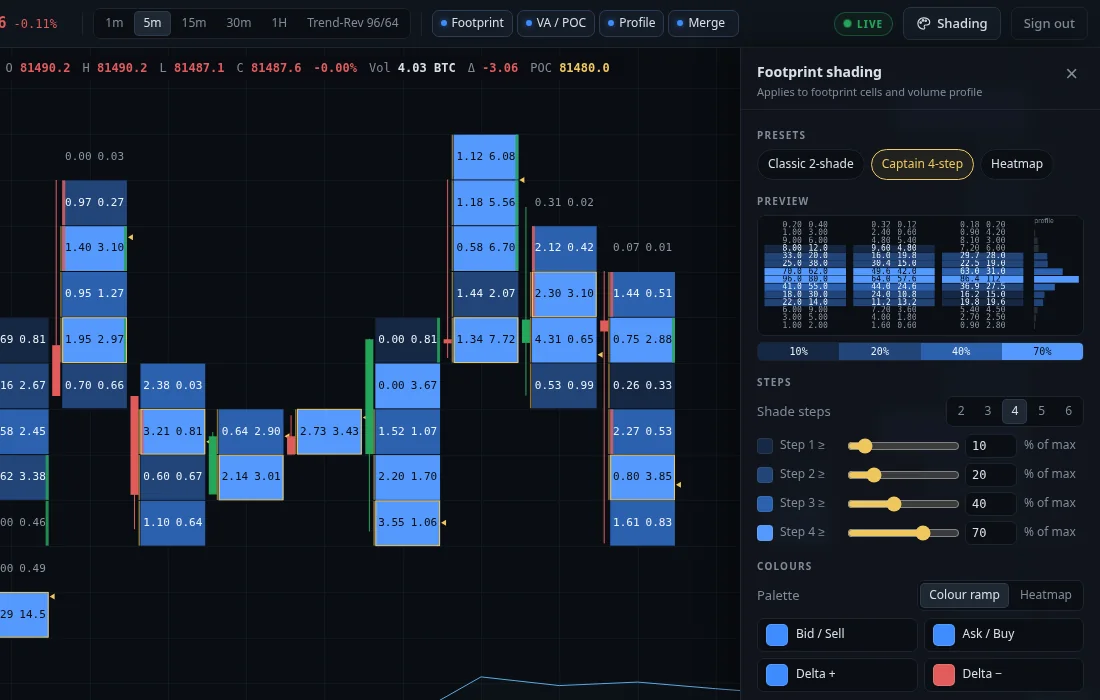
Shading you control
Two to six colour steps per side, each threshold set by you as a % of max volume. Same engine on cells and profile. You're the captain.
Volume profile · POC · value area
Visible-range profile on the right edge, plus a 70% value area, POC box and exact-tick Raw POC on every candle.
Delta, per bar and cumulative
Aggressive buy minus sell volume for every bar in the readout, with a cumulative delta strip under the chart.
Compact numbers & small-print filter
Large values abbreviated (1.2k), small ones kept precise, and a filter that hides prints below a size you choose.
Fast loading
Compact data, compression and smart caching. The chart loads in a fraction of a second and fetches footprint only for what's on screen.
Verified against raw Bybit trades
Built from individual trades, not pre-aggregated candles. Automated checks reconcile volume, delta and bars against Bybit's own data.
Multiple timeframes
1m, 5m, 15m, 30m and 1H, plus Trend-Reversal bars. Switching is instant once a timeframe has loaded.
Your colours. Your thresholds.
Most platforms give you two shades and decide the cut-offs for you. In FLOW you choose the number of steps and where each one starts: 10%, 20%, 40%, 70% of max, or whatever you trade with.
- 2–6 steps per side, light-to-dark ramp or heatmap
- Shade by bid/ask, total volume or delta
- Reference max per candle or across the visible range
- Applied identically to footprint cells and the volume profile
Bars that follow the market, not the clock
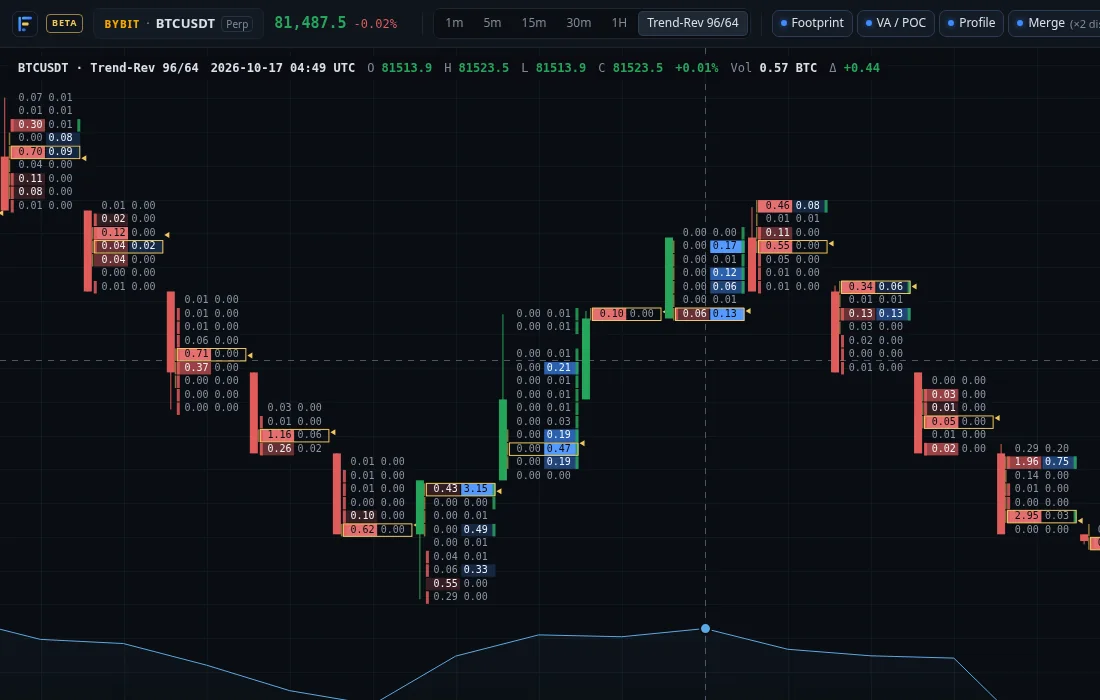
Trend-Reversal 96/64 Tick8 prints a new bar when price has actually moved, so quiet hours compress and fast moves get the detail they deserve. Every bar carries its full bid/ask footprint.
- Fixed parameters: 96-tick trend, 64-tick reversal, 8-tick footprint rows
- Sessions reset at each UTC midnight
- Footprint, value area and Raw POC on every bar
Made for people who read the tape
FLOW is shaped by how discretionary order-flow traders actually work: scalping off prints, reading absorption, and refusing to trade numbers they can't trust.
Numbers first
If the totals are off, nothing else matters. Every candle is derived from raw trades and checked against the exchange's own data. When a short gap in our live feed does happen, the chart marks it and fills it from Bybit's daily archive.
Read granularity, not noise
The bid/ask ladder is the default view, so thin spots and absorption are easy to see. Hide small prints and abbreviate big ones to keep the ladder readable.
Control without a manual
The important settings are one click away in the toolbar, with plain-language tooltips. Presets to start from, sliders to make it yours.
Fast enough to stay in flow
No install, no heavy client. Open a link, the chart is there, and live updates arrive as trades print.
Coming next
These are not in the beta yet. They're what we're building next, in roughly this order. Beta testers help decide the priorities.
Alerts
Large print at a level, open-interest spike against delta, price into a naked POC or value-area edge.
Open interest & delta panes
OI change and delta histograms in panes under the footprint, aggregated the way you choose.
Naked POCs & TPO
Untested POCs, single prints and composite TPO profiles that stay visible at every zoom level.
More exchanges
Additional venues beyond Bybit, each clearly labelled so you always know whose volume you're reading.
Delta cluster view
An alternative to the bid/ask ladder for traders who read net delta per price.
Saved layouts
Keep your shading, timeframe and layers in sync across devices.
Free while we're in beta
The beta is invite-only and free. We'll announce paid plans well before the beta ends, and beta testers will hear first.
- Live BTCUSDT footprint
- All timeframes + Trend-Reversal
- Custom multi-step shading
- Volume profile, POC, value area
- Delta and cumulative delta
- Direct line to the team for feedback
Questions, answered
Which markets does FLOW cover?
Right now, one market done properly: the Bybit BTCUSDT perpetual. More exchanges and symbols are on the roadmap.
Where does the data come from, and how accurate is it?
From Bybit's public trade feed: every individual trade, live over WebSocket. Older history is rebuilt from Bybit's public daily trade archives. Candles, footprint, delta and profiles are computed from those raw trades, and automated checks compare the results with Bybit's own data. If our live feed has a short outage, the chart marks the gap, and it's filled from the next daily archive.
What are Trend-Reversal 96/64 Tick8 bars?
Bars that close on price movement instead of time. On Bybit BTCUSDT one tick is $0.10, so a bar completes after a 96-tick ($9.60) move in the trend direction or a 64-tick ($6.40) reversal. Footprint rows are 8 ticks ($0.80) tall. You get more bars when the market moves and fewer when it's quiet.
Is it really free?
Yes, for the whole beta. We'll announce paid plans before the beta ends, and nobody will be charged without signing up for a plan.
Do I need to install anything?
No. FLOW runs in any modern browser. A large screen is best for footprint work, and the chart also works on tablets and phones.
Can I place trades from FLOW?
No. FLOW is an analysis tool. It doesn't connect to your exchange account and never asks for API keys.
How do I join the beta or send feedback?
Email aitestbeta2025@gmail.com. Tell us how you trade and which tools you use today. Feedback from testers directly shapes the roadmap.
Ready to read the tape properly?
Join the private beta and help shape FLOW Terminal.